
Imagine a meeting with one shared floor
Six people are in a meeting. Everyone has something to say, but they share the same floor. When one person speaks, the others need to wait and listen.
Would adding more people—or asking everyone to speak louder—give the meeting more time?
No. More people still share the same time to talk. If the work can be split into separate groups in separate rooms, those conversations can happen alongside one another without competing for the same floor.
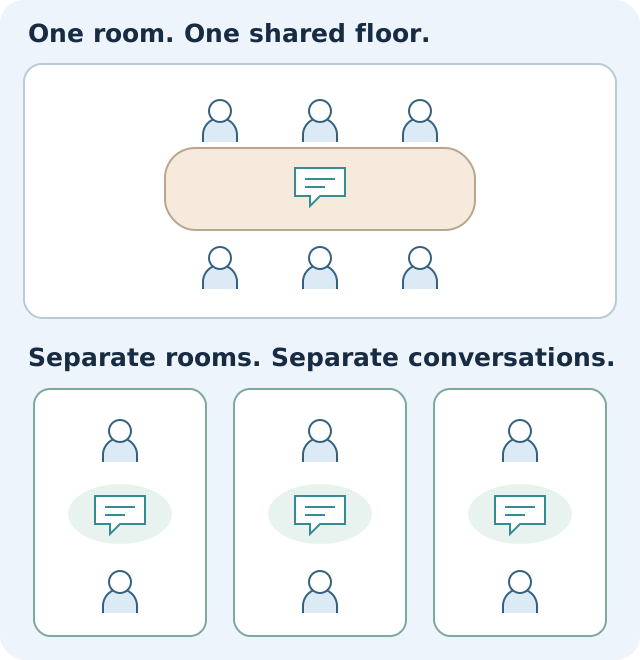
Wi-Fi can have a similar problem. More equipment and stronger signals do not automatically give you a better connection.
Is this happening in your home or office?
If you’re in Westchester and adding another mesh point hasn’t helped, our Wi-Fi optimization service starts with the system you already have. We check placement and settings before recommending more equipment. You can review pricing or request a free assessment.
Your phone needs to talk back, too
Now imagine the person leading the meeting speaks loudly, but someone at the back answers quietly.
You can hear them clearly. That does not mean they can hear you just as well.
Your Wi-Fi equipment and your phone, laptop or smart device need to communicate in both directions. Turning up the equipment’s signal does not necessarily help your device answer it.
That is one reason you can see plenty of Wi-Fi bars and still have a frustrating connection. It is not the only possible cause, but it explains why signal strength alone does not tell us everything.
A real assessment with six Wi-Fi access points
During a recent visit, we found six access points—the devices that provide Wi-Fi—installed close together. They were transmitting at high power, using overlapping channels and taking up more radio space than suited the setting.
It was like several groups trying to hold their meetings in the same room.
The useful next step was to look at how the existing equipment was arranged and configured, before deciding whether more was needed.
This does not mean six access points is always too many. A large home, busy office or building with difficult walls may need that many or more. The number only makes sense in the context of the space.
Give each conversation room to work
A Wi-Fi specialist can look at the equivalent of:
- Where groups meet. Would moving a device put it closer to the people who need it?
- How loudly they speak. Is each device reaching the area it needs to, without unnecessarily crowding the others?
- How the conversations share the room. Can the equipment use the available radio space more effectively?
- How information gets into the room. Is the connection behind the Wi-Fi working properly?
In this analogy, the shared floor is airtime, and separate rooms represent separate, non-overlapping channels. Voices carrying between rooms are like signals reaching farther than necessary. Wi-Fi devices already follow rules to share airtime; the analogy is simplified, and available channels and interference vary. Adding another device without a plan can add competition instead of solving the problem.
Can you have too many mesh Wi-Fi points?
Yes—but there is no magic number that works for every home or office. Mesh points need useful places to serve and good connections back to the rest of the system. Putting several close together may add competition for the same radio space without helping the room at the far end of the building.
Think of the meeting: adding another participant to a busy room doesn’t help someone who cannot hear from down the hall.
A point placed in a dead spot can also struggle to pass information back. It usually needs to sit somewhere it can still communicate well with the rest of the system, while extending coverage toward the area that needs help. When practical, connecting points with Ethernet cable can give them a more reliable path back.
Before buying another point, review where the existing ones are placed and test performance in the rooms you actually use. More points can help a larger property; fewer or differently placed points may work better in another. Measurements should guide that decision.
What happens when you add another Wi-Fi router?
A second router is not automatically part of the same Wi-Fi system. For example, you might have your Verizon or Optimum router broadcasting alongside a separate mesh kit, or an old router plugged in to help cover another floor.
Those devices may create separate networks instead of working together. Giving them the same Wi-Fi name does not, by itself, make them a coordinated mesh system.
There can also be a setup issue behind the signal. If both devices are acting as routers, traffic may pass through two layers of routing—often called double NAT. That is not always a problem, but it can complicate gaming, remote access or connections between devices. Connecting equipment incorrectly can cause other conflicts, too.
The right setup might use an access point mode, a bridge mode or a different connection between devices. It depends on the equipment and any provider services you need to keep working. We check the complete setup before changing those settings.
Signs that adding more equipment hasn’t solved the problem
- You added a mesh point, but the back bedroom is still slow.
- Your device has full bars, yet video calls freeze.
- Connections drop as you move between rooms or floors.
- You switch between Wi-Fi names to get a usable connection.
- Your provider’s Wi-Fi and a separate mesh system are both running, and you’re unsure which one your devices use.
These are reasons to investigate, not proof that you have too many devices. Internet-service problems, cables and individual devices can cause similar symptoms.
Should you buy another router or mesh point?
Maybe—but first, find out what is causing the trouble.
If a room has little or no coverage, another well-placed device may help. If the existing devices are poorly positioned or competing with each other, a change to the setup may be a better first step.
And sometimes the issue is elsewhere: the internet service, a cable or the device you’re trying to use. More Wi-Fi equipment would not resolve those problems.
You do not need to work out which explanation is right before contacting us. Tell us what you notice:
- “Video calls freeze in the back office.”
- “The bedroom has full bars, but nothing loads.”
- “We added another mesh point and it didn’t help.”
- “It works in one room and falls apart in the next.”
Those observations give us a place to start.
Get the equipment working together
Our job is to understand what is happening, explain it clearly and recommend a sensible next step. That might mean moving existing equipment, adjusting settings, fixing a connection or planning a different installation.
Explore Wi-Fi optimization for Westchester homes and businesses or request a Free Wi-Fi Assessment. The assessment includes review and recommendations; any fixes or configuration work are agreed and priced separately.
Want the technical explanation? Read Can too many access points make your Wi-Fi worse?, which covers channels, channel width and transmit power, with links to technical references.